
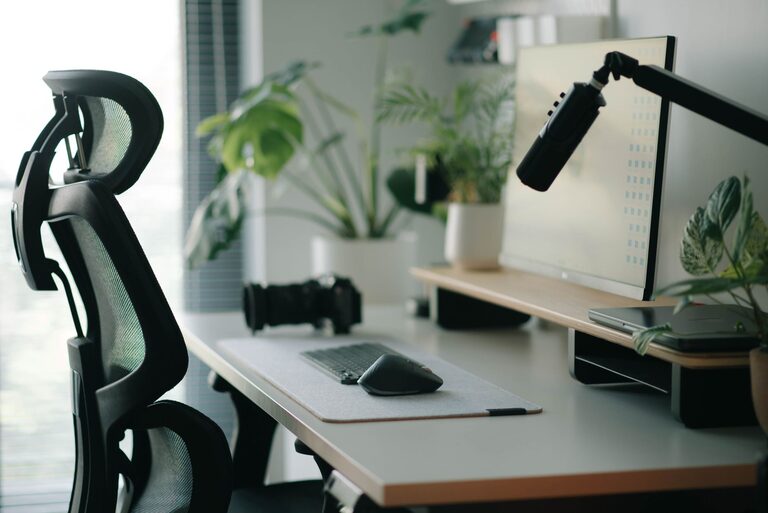
Desk Setup Tips for Focus and Comfort
Creating a workspace that encourages both focus and comfort is essential for productivity and well-being, whether you work from home or at an office. A well-organized desk setup can reduce distractions, prevent physical discomfort, and help you stay engaged throughout the day. In this post, we’ll explore practical tips for designing a desk setup that promotes concentration and comfort.
Why Your Desk Setup Matters
Your desk is more than just a place to put your computer; it’s where you spend many hours each day. An effective desk setup supports your workflow, minimizes discomfort, and can even boost your mood. By paying attention to the arrangement of your tools and the ergonomics of your space, you can create an environment that helps you stay focused and feel good.
Choose the Right Desk and Chair
Desk Height and Size
Select a desk that suits your height and provides enough surface area for your computer, accessories, and documents. A desk that’s too small can feel cluttered, while one that is too large can lead to disorganization.
– Standard desk height: Typically around 28 to 30 inches.
– Ensure your desk allows you to place your forearms parallel to the floor when typing.
Ergonomic Chair
Invest in a chair that supports good posture. Key features include:
– Adjustable height
– Lumbar support
– Comfortable seat cushion
– Swivel and smooth-rolling casters for mobility
Proper seating reduces strain on your back and neck, allowing you to focus longer without discomfort.
Position Your Monitor Correctly
Your monitor placement significantly affects your posture and focus.
– Place the top of your screen at or slightly below eye level to avoid neck strain.
– Keep the monitor about an arm’s length away, roughly 20 to 30 inches.
– Use a monitor stand or adjustable arm if necessary to achieve the right height and distance.
– Position the monitor to reduce glare from windows or overhead lights.
Keyboard and Mouse Placement
Your keyboard and mouse should be easy to reach and allow your wrists to stay in a neutral, relaxed position.
– Place the keyboard directly in front of you.
– Keep the mouse close enough to prevent overreaching.
– Consider using an ergonomic keyboard or mouse to reduce strain.
– Use a wrist rest if needed to support comfort.
Optimize Lighting
Good lighting reduces eye strain and improves focus.
– Utilize natural light whenever possible, but avoid direct glare on screens.
– Use a desk lamp with adjustable brightness and direction to provide task lighting.
– Choose bulbs with a color temperature around 4000K for a balance of warm and cool light.
– Avoid harsh fluorescent lighting that can cause headaches and fatigue.
Organize Your Desk for Minimal Distractions
A cluttered desk can distract and overwhelm you. Organize your workspace to keep only the essentials within reach.
– Use desk organizers, trays, or drawers to store supplies.
– Keep frequently used items like pens, notebooks, and chargers accessible but tidy.
– Reserve space for writing or other non-digital tasks.
– Limit personal items to a few meaningful objects to maintain focus.
Incorporate Comfort Accessories
Small additions can improve comfort and help you maintain good posture.
– Footrest: Helps keep your feet flat and knees at a 90-degree angle.
– Anti-fatigue mat: Useful if you use a standing desk.
– Cable management: Use clips or sleeves to organize cords, preventing tangles.
– Plants: Adding greenery can reduce stress and improve air quality.
Maintain Healthy Habits at Your Desk
Even the best setup won’t help if you stay in the same position for hours.
– Take regular breaks to stand, stretch, and rest your eyes (try the 20-20-20 rule: every 20 minutes, look at something 20 feet away for 20 seconds).
– Adjust your posture throughout the day.
– Stay hydrated and keep healthy snacks nearby to maintain energy levels.
Final Thoughts
Creating a desk setup that fosters both focus and comfort takes some thought but pays off with better productivity and reduced discomfort. By choosing the right furniture, positioning your equipment ergonomically, organizing effectively, and maintaining healthy habits, you can transform your workspace into a place where you enjoy spending time. Whether you’re tackling work projects, studying, or pursuing creative hobbies, a properly arranged desk supports your best efforts every day.